
The project
«Alfa Alfabetspill» was created as a part of the course «Brukerorientert design» in my bachelor’s degree at HIOF. The course project was to create a video of a prototype that could have a legitimate use in the real world, made by using techniques learned in the course. The prototype did not have to be fully functional, but we had to have some technology that could reasonably achieve the goals of the device.
This device is meant for kids at a kindergarten or early school age to learn the individual letters and how to spell with them.
This device is meant for kids at a kindergarten or early school age to learn the individual letters and how to spell with them.
The design
The design of the device went through several iterations and minor alterations. We started with the idea that we wanted to use micro:bit in order to use magnets to play sounds. We went through several concepts, starting with motivational quotes and ending up with a children’s game that could help with early education. When evaluating whether or not the design would actually be helpful for children, we decided to interview some kindergarten workers.
This is primarily because testing devices with children adds additional need for permissions. This would amount to more work than was expected for the course, so we decided to just interview workers instead. However, if this was for a larger scale project, I would recommend testing with both children and any relevant workers or caretakers.
After we verified that the game design would work for children, we focused on the more physical aspects of the device. We used several prototypes to check the advantages and disadvantages of different designs. This was primarily done with paper prototypes, as they are easy to produce. We quickly found that we wanted a box that could open and close in order to store the letter blocks. We ended up with the final design of the box due to how easily it can be stored, while taller designs would be more difficult. We also wanted to make sure the screen and detector plate was big enough for a child to use without issue. After the box was created, we decorated it to look like a game device.
This is primarily because testing devices with children adds additional need for permissions. This would amount to more work than was expected for the course, so we decided to just interview workers instead. However, if this was for a larger scale project, I would recommend testing with both children and any relevant workers or caretakers.
After we verified that the game design would work for children, we focused on the more physical aspects of the device. We used several prototypes to check the advantages and disadvantages of different designs. This was primarily done with paper prototypes, as they are easy to produce. We quickly found that we wanted a box that could open and close in order to store the letter blocks. We ended up with the final design of the box due to how easily it can be stored, while taller designs would be more difficult. We also wanted to make sure the screen and detector plate was big enough for a child to use without issue. After the box was created, we decorated it to look like a game device.
The technical side
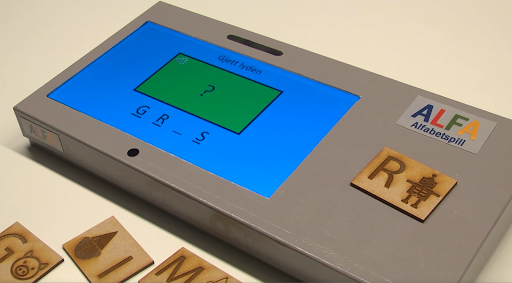
Alfa uses small blocks with Letters and corresponding illustrations in order for the kids to understand which letter they are using. Which, when placed on the device will activate the device and update the screen.
The gameplay, as shown in the video above is to use the blocks to spell what object or animal is associated with the sound coming from the device. If the player lays the correct block on the device, the letter gets filled in and the device gives a positive response. However, if the player lays down the wrong block, the device gives a somewhat negative response and no letters get filled in. When a game is completed, a new game can be started with a new word.
Initially, when working on how to make the prototype, we looked into using a micro:bit device to get it to work. Doing this, we managed to get the game functional, but with one limitation, that the display was restricted to led lights that would light up, imitating letters. The way we did this was by using magnets with different strengths that were attached to each letter block. This made it so that we could get a response based on which magnet we used.
While this initial solution made the game functional, we wanted to add a display to the game, in order to keep the user’s attention better. This was however, not something we could easily add without changing our pre-existing technical solution, something we did not have the time for.
Knowing that the project did not require a more technical solution than what we had created, we chose to use this as the proposed technical solution, while using the «Wizard of OZ» solution for the actual video prototype.
In order to give the illusion that we had a device with a fully functioning display, we decided to use a remote controlled screen with a prepared presentation as the device display. This enabled me to simply trigger each slide of the presentation off-screen with a linked device. Timing it so that it appeared as if the game progressed along with the user’s actions in the video. This allowed us to create the video prototype as shown in the video, with a “functioning” display.
The gameplay, as shown in the video above is to use the blocks to spell what object or animal is associated with the sound coming from the device. If the player lays the correct block on the device, the letter gets filled in and the device gives a positive response. However, if the player lays down the wrong block, the device gives a somewhat negative response and no letters get filled in. When a game is completed, a new game can be started with a new word.
Initially, when working on how to make the prototype, we looked into using a micro:bit device to get it to work. Doing this, we managed to get the game functional, but with one limitation, that the display was restricted to led lights that would light up, imitating letters. The way we did this was by using magnets with different strengths that were attached to each letter block. This made it so that we could get a response based on which magnet we used.
While this initial solution made the game functional, we wanted to add a display to the game, in order to keep the user’s attention better. This was however, not something we could easily add without changing our pre-existing technical solution, something we did not have the time for.
Knowing that the project did not require a more technical solution than what we had created, we chose to use this as the proposed technical solution, while using the «Wizard of OZ» solution for the actual video prototype.
In order to give the illusion that we had a device with a fully functioning display, we decided to use a remote controlled screen with a prepared presentation as the device display. This enabled me to simply trigger each slide of the presentation off-screen with a linked device. Timing it so that it appeared as if the game progressed along with the user’s actions in the video. This allowed us to create the video prototype as shown in the video, with a “functioning” display.